Wired Carplay Adapter for Chevrolet, Ford, Toyota,Adapter 2-In-1: Plug-And-Play USB Car Connector,For Both Apple and Android,Converts Wired to Wireless,Multifunctional Car Bluetooth Connection Box


Wired Carplay Adapter for Chevrolet, Ford, Toyota,Adapter 2-In-1: Plug-And-Play USB Car Connector,For Both Apple and Android,Converts Wired to Wireless,Multifunctional Car Bluetooth Connection Box
Compatibility Requirement: Only compatible with vehicles equipped with original factory wired CarPlay. Do not purchase if your vehicle does not have this feature.
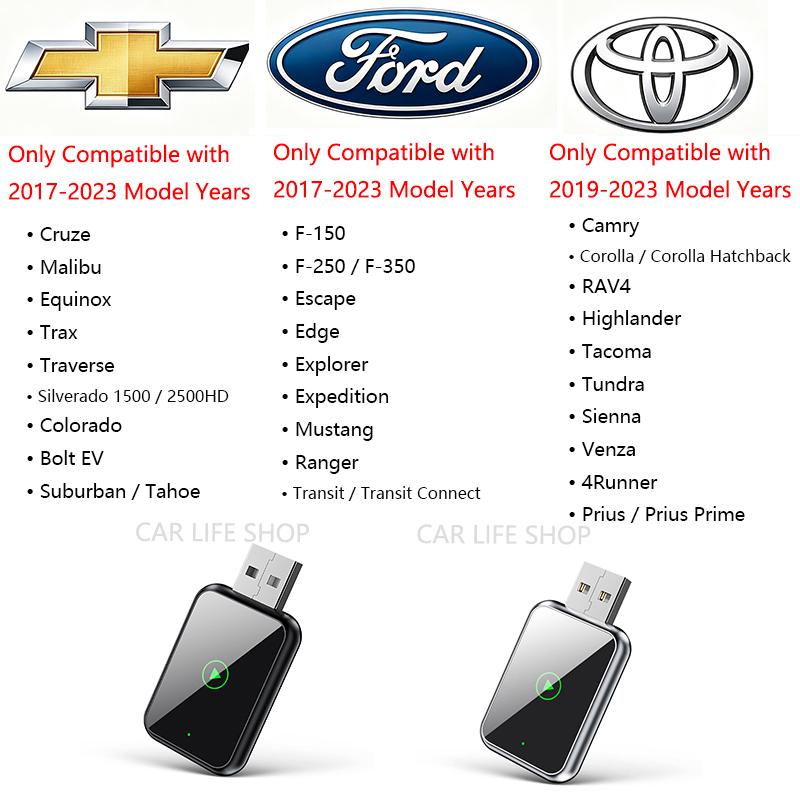
Wired CarPlay Adapter for (Chevrolet, Ford,2017-2023 Models)(Toyota 2019-2023 Models)
Key Features:
- Convert Wired to Wireless: This adapter turns wired CarPlay or Android Auto into wireless.
- Fast Data Transfer: faster data transfer for music, maps, calls, and voice commands.
- Compatibility: Works with iOS & Android, supports original car touchscreens, buttons, and MIC controls.
Important Notices:
- No Streaming Support: Does not support YouTube, Netflix, or screen mirroring.
- Car Requirement: Requires built-in wired CarPlay or Android Auto.
- Compatibility Check: If your car has built-in wireless CarPlay, this product is invalid.
Setup & Design:
- Plug and Play: Type-C/USB plug, auto-connects via Bluetooth/WiFi.
- Durable: Metal edges for heat control, 10,000+ insertion tests.
- Safe Design: 5V safe design protects your car’s USB port.
Wireless Freedom:
- Certified Fit: For cars with wired CarPlay/Android Auto (Chevrolet,Ford,Toyota, etc.).
- Keep Factory Features: Go wireless without compromises.
【 Warm Tips 】
Package: 1x Adapter + 1x User Manual.
Warranty: 12-month warranty + lifetime technical support.
Returns: Returns are accepted within 30 days — please contact customer service
Note: Not waterproof; keep dry.
Confirm compatibility. Upgrade your drive. Experience the future of in-car connectivity with CAR LIFE
Common Questions:
Q1: The adapter disconnects frequently or overheats?
A: Please check the output current of your car’s USB port. Ensure it provides no less than 1A (1000mA). Low current output is the most common cause of performance issues.
Q2: Why is there lag, audio distortion, or frequent disconnection?
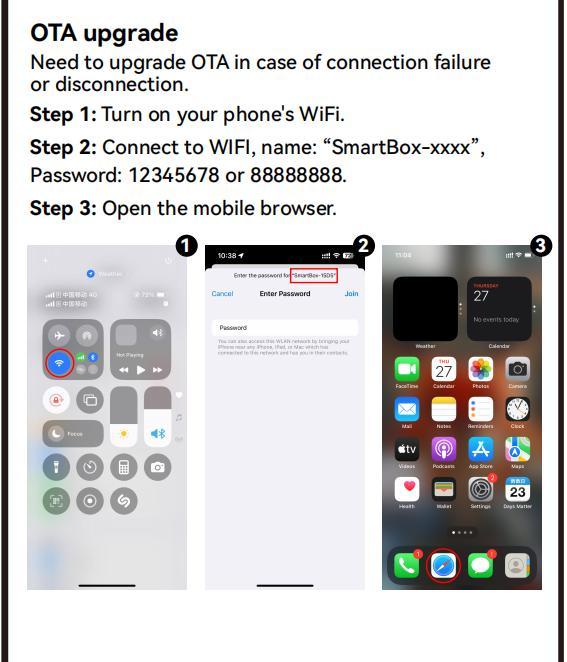
A: Please update the adapter’s firmware via OTA (Over-the-Air) to the latest version.
Q3: My phone is not listed in the compatible models.
A: Compatibility is determined by the phone’s system version, not the specific model. Please ensure your iPhone is on iOS 10.0+ or Android device on Android 11.0+.
Q4: Connection fails during first-time pairing?
A: Follow this quick troubleshooting checklist:
Check Compatibility: Confirm your car has factory-wired CarPlay/Android Auto.
Reset Bluetooth: On your phone, forget the "AuToLink-xxxx" device, turn Bluetooth off/on, then re-pair.
Restart the Adapter: Unplug the adapter from the USB port, wait 10 seconds, then reinsert it.
Update Car System: Ensure your car’s infotainment system is running the latest firmware (check your car manufacturer’s official guide).
Q5: How to switch back to wired CarPlay?
A: Simply unplug the adapter from the USB port—your car will automatically revert to the factory wired CarPlay/Android Auto interface. No extra steps needed.